



Table of Contents
The new office looks ready. Cabling is pulled, badge readers are mounted, cameras are online, network access is configured, and help desk support is “covered.” Then employees arrive, visitor badges don’t sync, Wi-Fi drops in conference rooms, and tickets bounce between vendors because no one owns the full operating outcome.
Scott Bartlett, CEO at iTi Communications, notes: “Ownership has to be designed before opening day, because the handoff between installation and support is where delays, security gaps, and user frustration usually show up.”
That’s why the difference between managed services and professional services matters before a build-out, migration, upgrade, or multi-location support plan begins, especially when professional and scientific services represent around 18% of impacted sectors in one Cisco Talos threat analysis. Ownership matters.
Managed Services Vs Professional Services In Plain English
The choice affects ownership, budget timing, and continuity.
-
Project work has endpoints: Professional services design and build defined-scope work, including system integration, network and SD-WAN design, cloud migration, data center refreshes, low-voltage cabling, access control, and video security.
-
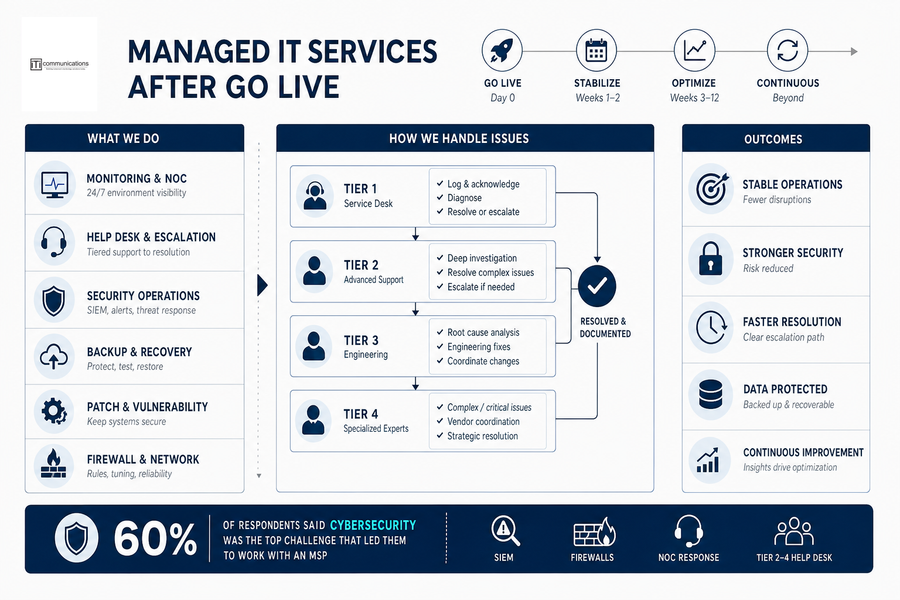
Managed work continues: Managed services cover 24x7x365 monitoring, NOC, help desk, patching, backups, managed SIEM, firewalls, and Hardware-as-a-Service.
-
The risk is handoff: Installed systems create risk when diagrams, passwords, warranty paths, or ticket ownership are unclear.
-
The value is continuity: When the same team understands the hybrid design across on-premises systems, cloud services, and combined environments, break-fix work and approved changes move faster.
IT Professional Services For Buildouts And Migrations
Project work locks in decisions that shape future support costs. A firewall choice, switch layout, camera placement, or cloud routing decision affects ticket volume, user access, and refresh planning long after the invoice is approved.
A Charlotte office build-out is a good example. Network drops, access control, video security, wireless coverage, and cloud connectivity all have to work when staff arrive on Monday. In systems integration Charlotte projects, we bring those threads together, from low-voltage build-outs through networking, security implementation, and cloud migration, so opening-day issues don’t become a scavenger hunt across separate vendors.
Managed IT Services After Go Live
The first weeks after go-live expose small issues. A new employee can’t reach a shared drive, a camera firmware question lands with the wrong vendor, and a firewall rule blocks an invoice upload before month-end close.
Monitoring, help desk escalation, security operations, backup, and patch management keep the environment visible and easier to support. In a recent study, 60% of respondents said cybersecurity was the top challenge that led them to work with an MSP, which matches what we see when SIEM, firewalls, NOC response, and Tier 2-4 help desk support need one clear path.
Explore Managed Services Next
Low Voltage Cabling Charlotte And The Physical Layer
Cloud access, security tools, and uptime still depend on the physical layer. If a conference room has one poorly placed network drop, or a badge reader lacks the right power planning, the ticket won’t feel like cabling to staff. It’ll feel like downtime.
-
Network access points: Staff productivity depends on properly placed, tested connections for workstations, phones, printers, wireless access points, and conference room devices.
-
Security device readiness: Badge readers and cameras depend on coordinated network, power, mounting, and telecom planning.
-
Future serviceability: Clean labeling, diagrams, and rack documentation reduce troubleshooting delays after launch.
Plan IT Ownership Before Go Live
Avoid the handoff gaps between project delivery and daily support. Work with iTi Communications to align buildout, migration, and managed service ownership.
Managed And Professional Services During Forced Change
External vendor changes and security expectations often turn routine planning into urgent work. The right answer may involve a project, ongoing support, or both across on-premises systems, cloud services, security controls, and physical infrastructure.
-
VMware contract reviews: Broadcom ended VMware perpetual licenses and moved to subscription-only licensing, while existing perpetual holders with active support were unaffected at the time. Confirm your contracts and transition options before renewals drive the timeline.
-
Windows endpoint planning: Windows 10 support ended October 14, 2025. Commercial ESU costs $61 per device in year one and doubles each following year for up to three years.
-
Zero trust redesigns: NIST SP 800-207 shifts focus from static perimeters to users, assets, and resources, with no implicit trust based only on network location.
-
Facility infrastructure demands: Telecommunications technicians install, maintain, and repair telecom infrastructure, including fiber optic cable.
|
Trigger Event |
First Operational Check |
Primary Decision Owner |
Useful Service Mix |
Concrete Output for Leadership |
|---|---|---|---|---|
|
Software vendor changes licensing terms during renewal season |
Compare procurement records, support status, license counts, and renewal dates in the contract repository |
CIO with Procurement Manager and Infrastructure Architect |
Professional assessment followed by managed renewal tracking |
90-day transition plan showing budget exposure, workload dependencies, and approval deadlines |
|
Endpoint operating system support deadline affects field and office devices |
Export device inventory from Microsoft Intune or Configuration Manager by model, OS version, owner, and business unit |
IT Operations Manager with Finance and Department Heads |
Upgrade project plus ongoing endpoint lifecycle management |
Device disposition list separating replace, upgrade, extend support, and retire actions |
|
Security policy requires identity-based access decisions across hybrid resources |
Map privileged accounts, SaaS apps, VPN use, on-premises servers, and conditional access policies |
CISO or Security Lead with Network Engineer |
Architecture redesign supported by continuous policy tuning |
Access control roadmap covering identity provider changes, logging requirements, and user rollout waves |
|
New site, renovation, or bandwidth constraint creates physical infrastructure work |
Validate cabling pathways, telecom demarcation points, rack space, fiber availability, and carrier handoff dates |
Facilities Director with IT Infrastructure Lead |
Professional design and installation coordination with managed monitoring after go-live |
Site readiness checklist linking carrier orders, cabling work, network equipment, and cutover responsibilities |
Professional Services And Managed Support Without The Handoff Gap
What breaks between “installed” and “supported” is rarely one device. It’s an undocumented switch change, an incomplete camera integration note, a missing access control diagram, or a ticket queue where every vendor says the issue belongs somewhere else.
GTIA reports that 49% of IT solution providers say their business remains a mix of project or product sales and recurring revenue, so the handoff is the real buyer issue.
-
Documentation follows the build: Diagrams, configurations, warranty details, and support notes move into operations.
-
Accountability stays clear: One accountable partner across cabling, networking, cloud, security, and support reduces vendor runaround.
-
Response gets faster: Teams familiar with the original design spend less time rediscovering VLANs, firewall rules, or camera paths.
-
Changes stay aligned: Future expansions, security updates, and refreshes work better when design intent is preserved.
Choosing The Right Service Model With iTi Communications
Changing providers, planning a build-out, or funding a migration is hard because service tickets, approvals, invoices, network access, and customer response times still have to run.
-
Map the business event: Identify whether the driver is a move, refresh, licensing change, security redesign, or recurring support issue.
-
Define ownership after launch: Decide who monitors, patches, documents, responds, and escalates when a ticket affects payroll, invoices, or customer response times.
-
Review physical and cloud dependencies: Include cabling, access control, video security, network design, cloud hosting, and backup needs.
If you’re planning a project, talk to an iTi engineer. We’ll help you separate the project work from the ongoing support model, with clear communication across IT, cybersecurity, cloud, network support, helpdesk, physical security, and infrastructure. That way, the ownership questions that show up on opening day are answered before staff, visitors, and customer deadlines are affected.